← Presentation home · Part 9 of 13
With RAG Proxy
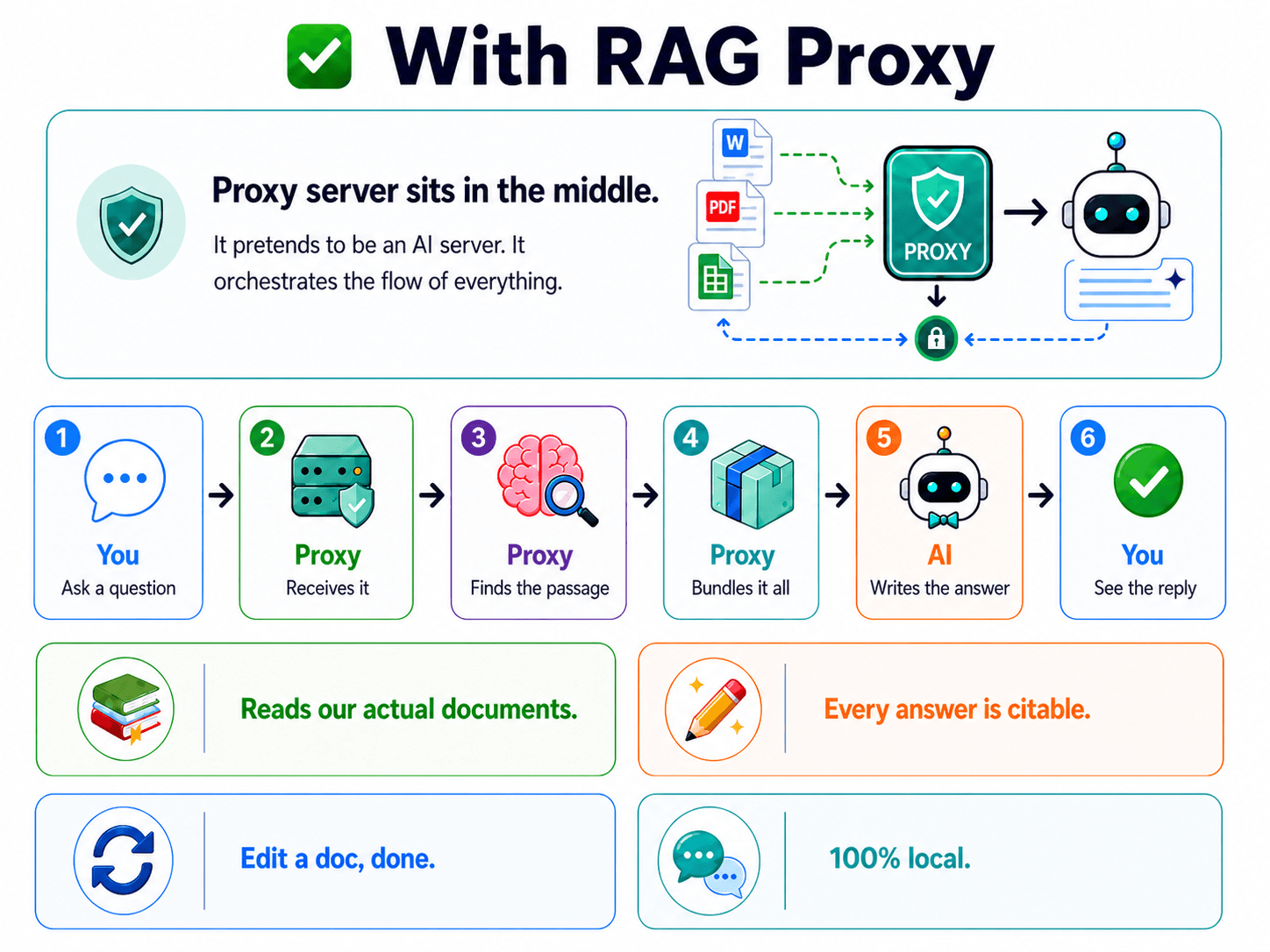
With RAG Proxy
TL;DR
A proxy is software that sits between the chat app and the AI engine, intercepts every question, does retrieval itself, and hands the model an enriched prompt. The chat app does not know. The RAG is no longer inside the app, it is between the app and the model. That one move fixes every architectural failure from the previous slide.
What a proxy actually is
A proxy is software that sits in the middle of a conversation between two other programs, intercepts the messages, and can change them in transit. Web developers know proxies from HTTP, your nginx in front of your application server, your CDN in front of your origin, your VPN in front of your traffic. Same idea applied to AI.
The RAG Proxy pretends to be an AI server. The chat app thinks it is talking straight to the model. It is not. It is talking to the proxy, and the proxy is quietly doing the retrieval work before passing the question along.
The key architectural shift from built-in RAG:
- Built-in RAG: the RAG lives inside the app.
- RAG Proxy: the RAG lives between the app and the model.
That one move fixes the architectural failures (the unfixable two from the previous deep-dive). The RAG is no longer locked inside one app and no longer bound to one fixed pipeline.
The flow, step by step
| Step | Plain English |
|---|---|
| You ask | You type a question in the chat app, exactly as normal. |
| Proxy receives | The proxy gets the question first, because it is impersonating the AI server. |
| Proxy finds the passage | It searches your document database for the most relevant chunks. |
| Proxy bundles it all | It injects those chunks into the prompt alongside your question. |
| AI writes the answer | The real AI engine receives the enriched prompt and answers from it. |
| You see the reply | It comes back through the proxy to your chat app. Looks like a normal chatbot. |
The user never knows RAG happened. It looks like a chat app that simply knows your policies. That invisibility is the point, the people using the system did not have to learn anything new.
The four properties
Every answer is citable
Because the proxy controls what context goes in, it knows exactly which document and section each chunk came from. It injects that source information with the chunk, so the model can name its sources. Verifiable answers, by construction, not as an afterthought.
In a clinical setting, that citation is the difference between "the AI said so" and "the AI said so, and here is the page you can verify in 10 seconds." Verification turns AI output from "trust this and hope" into something a compliance officer can sign off on.
Reads our actual documents
No training, no fine-tuning, no copying facts into a model. The proxy reads the live document files. The model answers from what it was just handed. The documents are the source of truth. Always.
Providing source passages reduces dependence on memorized facts. It does not eliminate retrieval errors or unsupported generation.
Edit a doc, you are done
This is the maintenance win.
- Before: Change a policy document. Retrain. Wait. Re-evaluate. Deploy. Pray.
- After: Change a policy document. Re-index (seconds). Done.
Compare to fine-tuning, where any change means a fresh training run and another evaluation cycle. The proxy treats documents as data, not as inputs to a training process. Data is cheap to change. Training is not.
100% local
The proxy, the search, the documents, the model, all of it runs on hardware you own. Nothing leaves the building. This is the slide-02 promise, kept.
If your data rules forbid cloud AI, this is the architecture that lets you use AI anyway. Same model, same chat experience, same answers, just inside your firewall instead of through someone else's.
Why "proxy" is the right word
A proxy does not replace anything. It slots in. Your chat app stays. Your model stays. The proxy just inserts itself into the gap between them and adds intelligence there.
That is why this is infrastructure, not a feature. It is a layer, and layers compose.
- One proxy in front of many apps? Possible.
- One proxy serving many document sets? Possible (next deep-dive shows how).
- Multiple proxies for different access levels? Possible.
A feature locked in an app can do none of that. The shift from feature to infrastructure unlocks composition, and composition is what makes systems durable.
What closes which loops
This slide deliberately closes every loop opened earlier:
| Earlier slide raised | This slide closes |
|---|---|
| PHI cannot leave the building (slide 02) | 100% local, kept |
| Fine-tuning hallucinated (slide 03) | Reads our actual documents, no training |
| Built-in RAG locked in the app (slide 06) | Proxy is outside the app, reusable |
| Built-in RAG silently broken (slide 08) | Proxy controls every step, visible, fixable |
Every problem named earlier has its match here. That is intentional, the proxy is not just a different design, it is the design that answers the failures.
🎛️ What the proxy saves you from configuring
When you use only Open WebUI with its built-in RAG, you'd need to tune a stack of settings under Admin Panel → Settings → Documents. Roughly thirty knobs, several of them quietly important. With the proxy in front, none of these matter to you, the proxy does its own retrieval upstream, so Open WebUI's RAG settings are bypassed entirely. The chat app is just talking to what it thinks is a model.
Here is what you would otherwise be tuning (and what the proxy absorbs):
📄 Content Extraction
| Setting | Without proxy, set to | What it does |
|---|---|---|
| Content Extraction Engine | Default | Turns files into text. Tika/Docling are for messy PDFs. |
| PDF Extract Images (OCR) | Off | Only on for scanned PDFs. |
| PDF Loader Mode | Page | Splits PDFs page-by-page before chunking. |
| Bypass Embedding and Retrieval | Off | On = disables RAG entirely. |
✂️ Text Splitter (chunking)
| Setting | Without proxy, set to | What it does |
|---|---|---|
| Text Splitter | Token (Tiktoken) | Split on tokens, not characters, lands chunks more predictably. |
| Markdown Header Text Splitter | On | Break at markdown headers first, so chunks are coherent sections. |
| Chunk Size | 1000 | Max tokens per chunk (~750 words). |
| Chunk Overlap | 100 | Each chunk repeats the last 100 tokens of the previous, so sentences across boundaries aren't lost. |
| Chunk Min Size Target | 200 | Tiny leftover fragments get merged up. |
The combo: header splitter ON + token splitter = split at headers first, sub-split a section only if it goes over 1000 tokens.
🧠 Embedding
| Setting | Without proxy, set to | What it does |
|---|---|---|
| Embedding Model Engine | Ollama | Use local Ollama, not bundled SentenceTransformers. |
| API Key | leave blank | Only needed for OpenAI/Azure. Local needs none. |
| Embedding Model | bge-m3 | Multilingual, long-chunk, hybrid-search capable. |
| Embedding Batch Size | 1 to 8 | How many chunks embed at once. |
| Async Embedding Processing | Off | Simpler errors during testing. |
| Embedding Concurrent Requests | 1 | Same reasoning. |
Gotcha: Change the embedding model and you must Reindex. Otherwise old vectors and new questions live in different shape spaces and retrieval silently breaks.
🔍 Retrieval
| Setting | Without proxy, set to | What it does |
|---|---|---|
| Full Context Mode | Off | On = dumps the whole document, defeating RAG. |
| Hybrid Search | On | Combines meaning-based and keyword search. |
| Reranking Engine | Default (SentenceTransformers) | Second-pass reorder by true relevance. |
| Top K | 5 | Retrieve 5 chunks initially. |
| Top K Reranker | 3 | Reranker keeps the top 3. |
| Relevance Threshold | 0 (blank) | Min score to include a chunk. 0 during testing. |
| BM25 Weight | 0.5 | Balance between lexical and semantic search. |
| RAG Template | leave default | Prompt wrapper for the model. |
📁 Files
| Setting | Without proxy, set to | What it does |
|---|---|---|
| Allowed File Extensions | leave default (or md,txt,pdf) | Limits what users can upload. |
| Max Upload Size / Count | leave default | Raise only if you hit the ceiling. |
| Image Compression | leave blank | Image-only setting. |
🗂️ Integration & Danger Zone
- Google Drive / OneDrive: leave off, local-first matches the philosophy.
- Danger Zone: the Reset buttons wipe data, avoid. Reindex Knowledge Base Vectors is the safe one if the embedding model changes.
✅ The proxy absorbs all of this
> With Open WebUI alone: Token splitter + Markdown Header splitter on, chunk size 1000 with overlap 100, bge-m3 via Ollama, Hybrid Search on, default reranker, Top K 5 then reranker keeps 3.
That sentence is what you would otherwise be carefully tuning. With the proxy in front, the proxy already does all of this upstream, with its own chunking, its own embedding, its own retrieval, its own reranking. Open WebUI's RAG settings don't apply to traffic that goes through the proxy. You configure once, in the proxy, and every chat app you wire up just inherits it.
That is the practical payoff of the architecture: the settings page becomes irrelevant.
What you give up
Honest accounting: the proxy adds complexity. You now have a service to run. It is one more thing that can break, one more thing to monitor, one more thing to deploy.
For a hobbyist with one chat app and one set of docs, that complexity may not be worth it. For an organization with multiple knowledge domains, multiple tools, automation needs, or PHI rules, the trade is good. Choose accordingly.
FAQ
Doesn't the proxy add latency? Yes, the retrieval step takes time. But it runs locally and the search is fast (milliseconds). In practice the retrieval cost is small next to the model's own generation time. You will not feel it.
What if the proxy goes down? Then you have a chat app pointed at a dead endpoint, same as if Ollama went down. It is one more service to run. The trade is worth it for the control you get, but it is a real trade and worth saying out loud.
How is this different from Open WebUI's built-in RAG, really? Location and control. Built-in RAG is inside one app, with its defaults, unreachable. The proxy is a standalone service you own, with your retrieval logic, reusable by any app that speaks the standard protocols. Same idea (RAG), completely different engineering.
Can the chat app see that the proxy is doing RAG? No, and that is the design. The proxy implements the same OpenAI and Ollama protocols the real model server uses. From the chat app's point of view, it is just a model. The invisibility is what makes it a drop-in.
Could I write my own proxy? Yes. The architecture is small (the next deep-dive but two shows the whole stack, a small Perl implementation). The idea is what matters; the implementation is just a few weekends.
If you only remember one thing
RAG moves out of the app and into a layer you control. That move, feature to infrastructure, is the whole point of the talk.